
Maybe a customer emailed to say your site is redirecting to something sketchy. Maybe Google is showing a red warning screen, or your home page has been replaced with a message you didn’t write. However you found out, finding a hacked WordPress site feels the same for everyone: your stomach drops.
Take a breath. It’s a bad day, but it’s a fixable one. What you do in the first hour decides how big the cleanup is. Here’s what to do if your WordPress site was hacked, in order.
A hacked site is stressful, but it’s almost always recoverable. The steps below keep the damage small and get you back to a clean site.
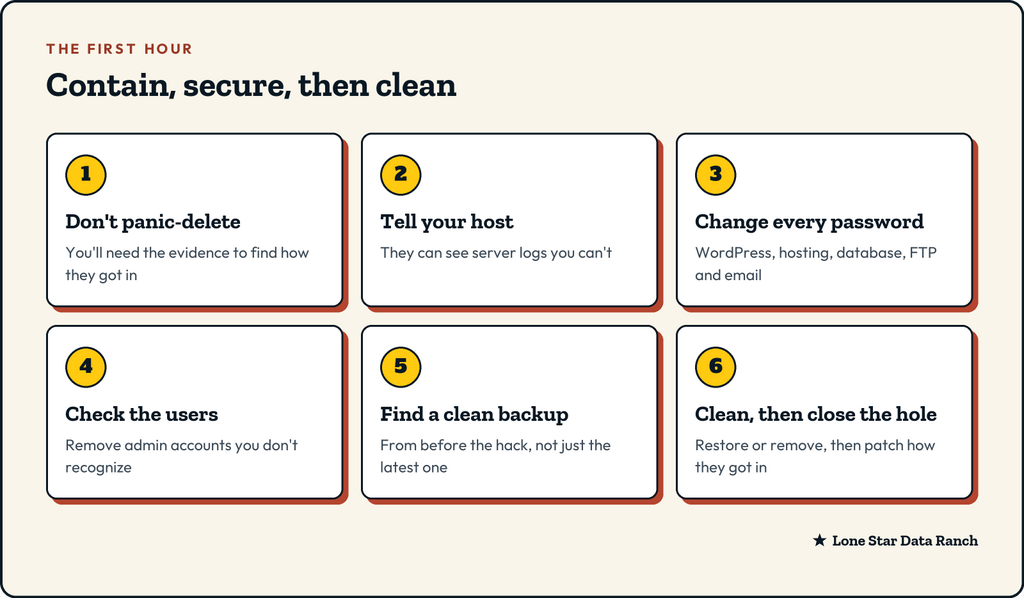
Minute 0 to 10: don’t make it worse
Your first instinct might be to start deleting files or reinstalling everything. Hold off for a few minutes.
- Don’t delete anything yet. Strange files and recent changes are clues to how the attacker got in. Wipe them and you lose the trail.
- Take screenshots of what you see: the defaced page, the warning, the redirect, any messages from Google or your host.
- Make a backup of the hacked site as it is right now. It sounds odd, but if a cleanup goes wrong, you’ll want a copy to work from. Label it clearly so nobody restores it by mistake.
If the site is showing something harmful to visitors, like a fake login page or a redirect to a scam, ask your host to take it offline or put it in maintenance mode while you work.
Minute 10 to 20: tell your host
Your host can see things you can’t: server logs, recent file changes, unusual traffic and whether other sites on your account are affected. Open a support ticket and include:
- Your domain name
- What you saw, and roughly when it started
- Your screenshots
- Anything you changed recently, like a new plugin, a theme update or a new user
A good host will help you contain it and point to where the problem started.
Minute 20 to 40: lock the doors
Assume every password connected to the site is known to the attacker. Change them all, from a computer you trust:
- WordPress admin passwords, for every account with admin access.
- Your hosting control panel login.
- The database password (your host can help, since WordPress needs the new one too).
- FTP or SFTP accounts.
- Email accounts on the same domain, especially if the site sends mail.
Then, inside WordPress, go to Users and look for administrator accounts you don’t recognize. Attackers often create one so they can get back in later. Remove any you didn’t create, after noting their names for your host.
If you can, turn on two-factor login for every admin account while you’re there.
On small business sites, the usual way in is an outdated plugin or theme, or a weak or reused password. Keeping things updated and turning on two-factor login closes most of those doors.
Minute 40 to 60: find a clean starting point
Now you need a version of the site without the infection. You have two main routes.
Restore from a clean backup
If you have backups going back a few weeks, find one from before the hack started. That’s why keeping backups for months matters: some infections sit quietly for weeks before they show themselves. Restore that backup, ideally to a staging site first, so you can check it’s clean before it goes live.
Clean the site in place
If there’s no clean backup, or you’d lose too much recent work, the site needs cleaning: removing injected code, replacing WordPress core files with fresh copies, reinstalling plugins and themes from their official sources, and scanning for anything left behind. This is careful work, and it’s where most people bring in help.
Then: close the hole
Restoring a clean site doesn’t fix how the attacker got in. If you skip this step, the same hole lets them back in, sometimes within days. Common causes:
- An outdated plugin or theme with a known security hole
- A “nulled” premium plugin, downloaded free from a sketchy site, with a backdoor built in
- A weak or reused password
- An old admin account belonging to someone who left long ago
Update everything, remove what you don’t use, and make sure only the people who need admin access have it.
After the first hour: keeping a hacked WordPress site clean
Once the site is clean:
- Check Google Search Console for security warnings, and request a review if your site was flagged.
- Tell customers if their data may have been exposed. If you collect personal information, there may be legal steps to follow.
- Keep an eye on it for a few weeks. Watch for new files, new users or traffic going somewhere odd.
How our setup helps
On our WordPress and WooCommerce plans, every site runs in its own isolated container behind a server-side firewall and antivirus scanning, which stops a lot of attacks before they reach WordPress and keeps a problem on one site from spreading to others. Daily backups are kept for 90 days and stored off-site, so there’s usually a clean copy from well before trouble started. With WordPress Care, Wordfence Premium and watched daily updates help close the holes most hacks come through.
The short version
- Don’t delete anything yet. Screenshot it and back it up as it is.
- Tell your host.
- Change every password and remove unknown admin users.
- Restore a backup from before the hack, or clean the site.
- Find and fix how they got in.
If your site has been hacked right now, open a support ticket and tell us your domain. We’ll help you get it back.
★ Lone Star Data Ranch ★
Need a hand with yours?
Fast WordPress hosting and day-to-day care from a crew in Dripping Springs, Texas.