
“Managed” might be the most stretched word in the hosting business. One company uses it to mean a person checks your site every day. Another uses it to mean a script that runs updates and hopes for the best. So what is managed WordPress hosting, really, and do you need it?
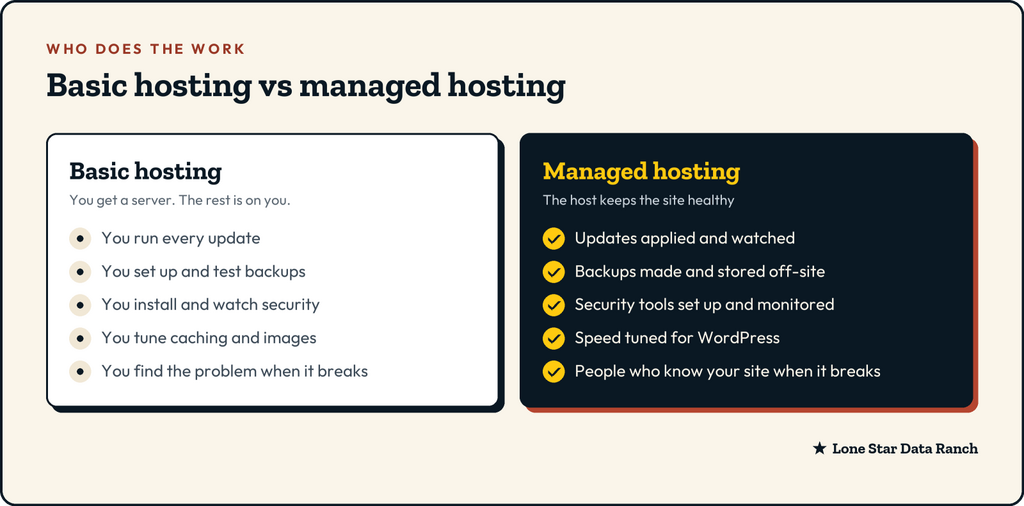
Here’s a plain answer: managed hosting means someone else is responsible for the jobs that keep a WordPress site healthy. The rest of this post walks through those jobs one by one, so you can ask any host exactly which ones they do.
A lot of WordPress trouble doesn’t come from hackers or broken code. It comes from sites that nobody had time to look after.
The five jobs every WordPress site needs done
Every WordPress site, from a five-page brochure to a busy store, needs the same five things looked after. The only question is who does them.
- Updates
WordPress itself, your theme and every plugin get regular updates. Some add features. Many fix security holes that attackers start probing for within days of the fix going public.
Running updates is the easy part. The real job is watching what happens after. Does the contact form still send? Does checkout still work? Did a plugin quietly change a setting? A managed host updates on a schedule and checks the site afterward, so a bad update gets caught by them and not by your customers.
- Backups
A backup only matters on the day you need it. Good managed hosting means backups that run automatically every day, are kept long enough to go back before a problem started, are stored off-site (somewhere other than the server your site runs on), and can actually be restored.
That last point catches a lot of people. A backup nobody has ever restored is a hope, not a plan.
- Security
Security on a WordPress site comes in layers:
- At the server: a firewall that blocks known attacks before they reach WordPress, malware scanning, and each site kept separate from its neighbors.
- In WordPress: a security plugin that watches logins and files, strong passwords, and only the people who need admin access having it.
- Over time: someone actually reading the alerts instead of letting them pile up in an inbox.
A managed host handles the first layer completely and helps with the other two.
- Speed
Fast WordPress sites aren’t an accident. They come from caching (keeping ready-made copies of pages so the server doesn’t rebuild them on every visit), image optimization, a current PHP version and enough server power for your traffic. On basic hosting you configure all of that yourself. On managed hosting it’s set up for WordPress from the start.
- Help when something goes wrong
This is the part you can’t see on a pricing page. When something breaks, do you reach someone who knows WordPress, or someone reading from a script? Managed hosting should mean the people answering your ticket can actually look at your site and fix it.
We had a customer whose online booking form broke after an update. Their previous host’s support team checked the server, said everything was fine and closed the ticket. We found the problem in about ten minutes: two plugins were fighting over the same script. We rolled one back, and bookings started coming in again that afternoon.
What managed WordPress hosting does not include
It’s worth being clear about the edges, so nothing surprises you later:
- Content. Writing pages, adding products and posting news is still your job, unless you’ve hired someone for it.
- Design changes. Small fixes are often included. A redesign isn’t.
- Plugins you add yourself. A good host will warn you about a risky plugin, but it can’t stop you from installing one.
- Your domain and email. These often live with other companies. Know where yours are.
When basic hosting is enough
Managed hosting isn’t for everyone, and you shouldn’t pay for work you’d rather do yourself. Basic hosting can be a fine fit if:
- You, or someone on your team, enjoys running updates and checking the site afterward.
- The site is simple and changes rarely.
- You already have a developer looking after it on a schedule.
If you’re nodding along to all three, keep your budget. If you read the list of five jobs and realized nobody is doing three of them, that’s the case for managed hosting.
How we split it at Lone Star Data Ranch
We do it in two layers, so you only pay for what you need.
Every WordPress and WooCommerce plan includes the server side of the work: each site in its own isolated container, a server-side firewall and antivirus scanning, free SSL, staging, LiteSpeed caching set up for you (NGINX and Apache are available too), and daily backups kept for 90 days, stored off-site, that you can restore yourself. All of it runs on Ryzen 9 servers with NVMe storage, behind a 99.9% uptime guarantee.
WordPress Care adds the hands-on part: Wordfence Premium and UpdraftPlus Premium set up for you, daily updates that we watch, uptime monitoring, cache and image tuning, a monthly report, and up to two hours of small changes each month. It’s $45 a month for your first site and $25 for each additional site, plus a one-time setup fee, on top of your hosting with us.
Care is a good fit for business owners who would rather spend their time on their business than on plugin updates and backup checks.
The question to ask any host
Before you sign up anywhere, ask one simple question: “Which of these five jobs do you do, and which ones are mine?” A good host will answer clearly, with no hedging.
If you’d like that answer from us, see what WordPress Care includes, or compare our hosting plans.
★ Lone Star Data Ranch ★
Need a hand with yours?
Fast WordPress hosting and day-to-day care from a crew in Dripping Springs, Texas.